Contents
A thoughtful reply to customer comments is a powerful tool for strengthening your online image and growing your business. Here are our tips for writing relevant responses, with practical methods and concrete examples that will help you turn every review into a chance to improve your service and build customer loyalty.
Everything described in this article is automated in the monbizness subscription, with an AI that answers in your tone.
How to respond to a customer review
Managing customer reviews takes a structured, well-thought-out approach. Every piece of feedback, whether positive or negative, is a chance to show your professionalism and your commitment to customer satisfaction . A well-written reply builds trust , boosts your online visibility and can even turn an unhappy customer into a loyal advocate for your brand. Discover our tips for responding to reviews effectively and get the most out of your interactions.

Why you should reply quickly
Your responsiveness plays a key role in how effective your reply is. We recommend responding to reviews within 24 hours, ideally the same day. This speed shows you are serious and that you listen. It also defuses tension before it escalates and shows your audience that you are always available.
A quick response limits the impact of a negative review , makes a good impression on prospects and highlights your internal organization and your ability to meet customer expectations . This proactive approach becomes a real competitive advantage in the digital age, when consumers expect instant answers.
Personalize and sign
Every message should be personalized so it doesn't feel like an automated reply. Mention the customer's first name and refer to specific details from their comment . This personalization proves you read their review and take their feedback seriously. Reply templates can save you time, but always adapt part of the text so your response sounds genuine. Making the effort to boost customer engagement with personalized review replies also strengthens your customers' attachment to your brand.
A signature adds a human touch and builds trust . Use a closing such as: "Kind regards, Jean, Customer Relations Manager". This small detail turns a corporate reply into a real, personal exchange. Signing your replies is one way to humanize your business with more personal review responses, showing that a real person stands behind the company.
Useful calls to action
Don't forget to include a relevant call to action in your replies. For a positive review , invite the customer to come back, recommend your business or discover what's new. This natural invitation keeps customers loyal and opens up new opportunities.
With an unhappy customer , give them a way to contact you privately: share an email address, a phone number or use the platform's messaging. This respects confidentiality, speeds up finding a solution and shows you want to talk directly.
Always finish with a clear commitment and a specific deadline: "We will get back to you within 48 hours" or "Our customer service team will call you tomorrow morning". This precision reassures the customer, holds you accountable and builds trust . It proves you have mastered customer review management and know how to respond to reviews professionally. To round out this advice, our resources on replying to reviews cover every situation, from compliments to criticism.
Replying to a positive review
A glowing comment deserves as much attention as a constructive review. Replying carefully to a positive review highlights your strengths, motivates your team and positively influences future customers reading your ratings. It is also a chance to thank your satisfied customers and encourage others to share their experience. This is also why it pays to reply to every Google review, positive ones included, and not only to criticism.
Examples of replies to a positive review
Here are different reply examples for different situations. For a simple 5-star comment, a short, warm reply is enough: "Thank you Sophie for this excellent rating! The whole team is delighted you're satisfied. See you soon!" This simple, upbeat wording shows your appreciation without overdoing it.
For a detailed review , take the time to answer point by point. For example, if a customer specifically mentions your welcome and your speed, you could reply : "Hello Marie, your feedback on our warm welcome and our responsiveness means a lot to us. We will share these compliments with the team! Looking forward to seeing you again - Thomas, Manager" .
- Gratitude : Always start by thanking the customer for taking the time to write their comment
- Personalization : Use their first name and quote a specific point from the review
- Team : Show that you will pass on the compliments to motivate your colleagues
- Return visit : Subtly invite them to come back or recommend you, without pushing
This flexible approach lets you adapt your replies while keeping your communication consistent. What matters is nurturing this positive relationship with your satisfied customers.
Highlight your strengths and invite customers back
Your reply to a review is a chance to showcase a strength or something new. If the customer enjoys a particular service, mention it: "We're delighted you liked our new offer" . This mention also informs future customers. An effective positive review reply combines a personalized thank-you with useful information.
The invitation should feel natural. A restaurant might say: "We can't wait to show you our seasonal menu" , while a professional service might say: "Feel free to recommend us to those around you" . This approach encourages repeat visits and positive word of mouth.
Responding well to a negative review
Handling negative reviews takes tact and a professional approach.
Every criticism is an opportunity to improve your customer service and prove your commitment to finding a satisfactory solution.
A well-written reply can turn a negative review into a showcase of your responsiveness, reassuring potential customers.

Apologies and a concrete solution
Use our negative review template by starting with a sincere apology. Phrases like "We are sorry about your bad experience" or "We deeply regret this inconvenience" immediately show empathy.
Absolutely avoid any defensive reply or excessive justification that could make things worse.
- Acknowledge feelings : Accept the customer's dissatisfaction without questioning it.
- Appropriate apologies : Apologize clearly when you are responsible.
- Concrete offer : Always offer compensation (refund, exchange or goodwill gesture).
- Continuous improvement : Briefly mention the steps taken to prevent the problem from happening again.
Always tailor your solution to the specific problem: an exchange for a faulty product, a free service for an unsatisfactory one.
This approach shows you want to do things right and can turn an unhappy customer into a loyal supporter.
Continue in private and fix the issue
Always offer to continue the conversation in private for better confidentiality and efficiency: "Please contact us directly at 01.23.45.67.89 so we can sort this out together."
This online conflict management protects your image while making a quick resolution easier.
Follow up rigorously until the problem is fully resolved, then get back to the customer to check their satisfaction.
This thorough follow-up proves you are serious and can turn an initially negative review into positive feedback about your responsiveness.
Handling abusive reviews
Distinguish constructive criticism from inappropriate content (insults, false or personal information).
Faced with a doubtful review, reply professionally: "We are sorry but we cannot find this situation in our records. We remain available to discuss it."
To report an abusive review, gather solid evidence (screenshots, exchanges) and follow the procedure of the platform concerned.
This methodical approach maximizes your chances of getting inappropriate content removed.
Organizing your review responses
Effective customer review management relies on rigorous organization and well-defined processes.
A system that combines monitoring, alerts and a workflow is the best way to leave no comment unanswered while keeping your service quality high.
This method helps you ensure consistent replies while making the most of your time.
Centralize and automate
Bring all your reviews together on a single platform using tools that integrate Google Business Profile, Facebook and the other channels where your customers speak up.
This centralization greatly simplifies responding to customer reviews , removes the risk of forgetting one and lets you track your online reputation end to end.
Set up real-time alerts so you are notified immediately of every new review posted.
- Multi-channel monitoring : Watch every platform where your customers can leave a review.
- Instant notifications : Get alerts so you can react quickly.
- Unified dashboard : See all your data and statistics at a glance.
- Smart automation : Use AI to generate pre-filled replies that you can personalize.
Automation is a valuable help for responding to customer reviews , but always remember to personalize the tone and content before publishing.
This system combines efficiency and authenticity in your exchanges.
Workflow and responsibilities
Clearly define your moderation workflow by specifying who handles reviews, who writes the replies and who approves them before they go out.
This setup prevents duplicates and ensures consistent communication.
Also plan specific procedures for handling delicate situations.
Train your team in the fundamentals: active listening, excellent spelling and thorough knowledge of your offers.
This training is essential to strengthen the trust your customers place in your customer service .
| Step | Owner | Deadline | Action |
| Detection | Monitoring tool | Immediate | Automatic alert |
| Reading | Community manager | 2 h max | Analysis and qualification |
| Writing | Customer service | 12 h max | Personalized reply |
| Approval | Manager | 24 h max | Check and publication |
Systematically document important incidents by noting all relevant information: review reference, date, actions taken and solution provided.
This traceability is valuable for continuously improving your customer review management processes.
Responding better to Google reviews
Your Google Business Profile is often the main storefront of your online reputation. By mastering this platform's features and applying best practices , you can optimize the impact of your replies on your local visibility and commercial appeal. Find out how to respond effectively to negative comments and strengthen your online reputation with proven methods and ready-to-use templates.
Collect and respond effectively
To better manage reviews and increase their number, share your direct link or a QR code at key moments: in your confirmation emails, on invoices or after each service. This proactive approach brings in more authentic reviews and reduces the impact of any negative feedback. The more reviews you collect, the more faithfully your average rating reflects the quality of your services.
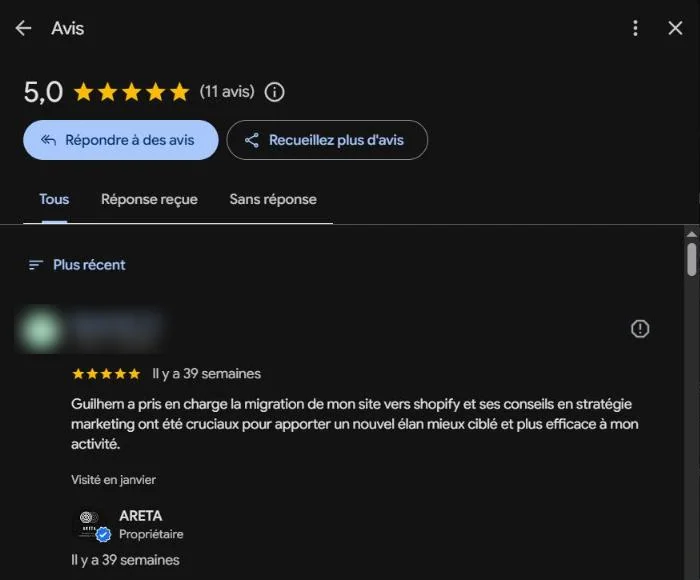
In your Google Business Profile , go to the "Reviews" section from your dashboard, then click "Read reviews". Next, select "Reply" to write your message. You can edit or delete your reply later if needed. The customer will be notified of your reply and can, if appropriate, adjust their rating.
Always adapt your replies to the specific context of Google, where users mainly look for useful information. Subtly highlight your strengths: "Our extended hours clearly met your needs, and we're delighted" or "Your satisfaction confirms the effectiveness of our new express service" . This informs potential customers while answering the original comment.
Report an inappropriate review
If you come across a review that breaks Google's rules, click the three dots to the right of the comment and select "Report review". Then choose the relevant reason: spam, conflict of interest, offensive or off-topic content. Provide tangible evidence to support your request (screenshots, exchanges with the customer). Tools like France Verif can help you document your moderation process.
If Google rejects your first report, use the internal appeal procedure and keep all your evidence. In the case of clear defamation, legal action (with a bailiff's report) is a drastic but costly solution.
While your report is being processed, respond publicly and professionally to limit the damage: "We are carefully looking into this situation and will contact you privately very soon" . This type of message reassures readers of your responsiveness without fueling the conflict.
Examples of review responses
Mastering different types of replies and adapting them to each communication channel significantly improves your interactions with customers.
Our reply templates , designed for a range of situations, help you keep quality consistent while making the most of your time.
Multi-channel reply examples
Discover our versatile reply examples , adaptable to all your channels and scenarios.
On Google: Favor a professional tone while staying approachable.
On Facebook: Don't hesitate to adopt a friendlier style and use emojis (if your brand identity allows it).
By email: Expand on your explanations and offer a detailed solution.
- Short positive reply : "Thank you Jean for your 5 stars! The whole team appreciates your satisfaction . See you soon! 😊"
- Detailed positive reply : "Hello Marie, we're delighted you enjoyed our welcome and our responsiveness. Your feedback motivates the whole team! - Sophie, Manager"
- Reply to a negative review : "Hello Pierre, we are sorry that your experience did not meet your expectations. Our customer service team is available at 01 23 45 67 89 to find a suitable solution. Kind regards, Marc"
Always personalize these templates by mentioning at least the customer's first name and a specific element of their message . This personal touch, however small, shows you are listening and avoids the impression of automated replies. The impact of personalized review responses on how readers perceive your business is also clearly noticeable.
Facing a negative review , combine an apology, a solution and an invitation to talk in private: "We regret this inconvenience and would like to offer you [solution]. Could you contact us so we can finalize this?" This approach reassures the customer concerned and strengthens the trust of future readers.
Measure and keep improving
Customer satisfaction analysis should be an integral part of your improvement strategy. Taking care over each answer is one of the most direct ways to improve customer satisfaction with review replies.
Regularly analyze 1 and 2-star reviews to identify recurring problems (service, products, delivery times). This data guides your priorities and makes your fixes more relevant.
Track your key indicators:
- Average response time
- Share of reviews handled
- Change in your average rating
- Percentage of customers who change their rating after resolution
These metrics prove how effective your management of review responses is.
Finally, showcase your progress with "Before/After" testimonials that illustrate your efforts and strengthen your prospects' trust.
Frequently asked questions
How can I quickly respond to all my customer reviews?
To respond effectively to your customer reviews , we advise you to:
- Set up instant notifications as soon as a new comment is posted
- Prepare customizable reply templates to save time
- Organize a clear process with designated owners
The goal? Reply within 24 hours at most, personalizing your message with the customer's first name and a specific reference to their experience. This method helps you manage reviews professionally while maintaining a quality customer relationship.
What should I do when a customer doesn't update their review after the issue is resolved?
In this situation, we recommend:
- Waiting about 7 days after providing the solution
- Politely contacting the customer by email or phone
- Don't hesitate to remind them of your request to update it, highlighting the corrective actions taken
If the customer confirms they are satisfied but doesn't change their review , send them the link to edit their comment directly. A patient, professional approach usually gets good results.
How can I tell a real review from a fake comment?
To spot fake customer reviews , check:
- Whether the customer exists in your databases
- Whether the information matches your actual services
- The author's account history (new profile, no other comments )
If you suspect a fake, reply publicly and ask for details. If the review is clearly fake, report it to the platform with the appropriate evidence (no order on record, factual contradictions).