Contents
- Apple Business Connect is now Apple Business
- Why your Apple Maps listing matters
- Create or claim your listing, step by step
- Make your listing appealing
- Ratings and reviews in Apple Maps
- Apple listing vs Google profile
- Apple Maps SEO: best practices
- Frequently asked questions
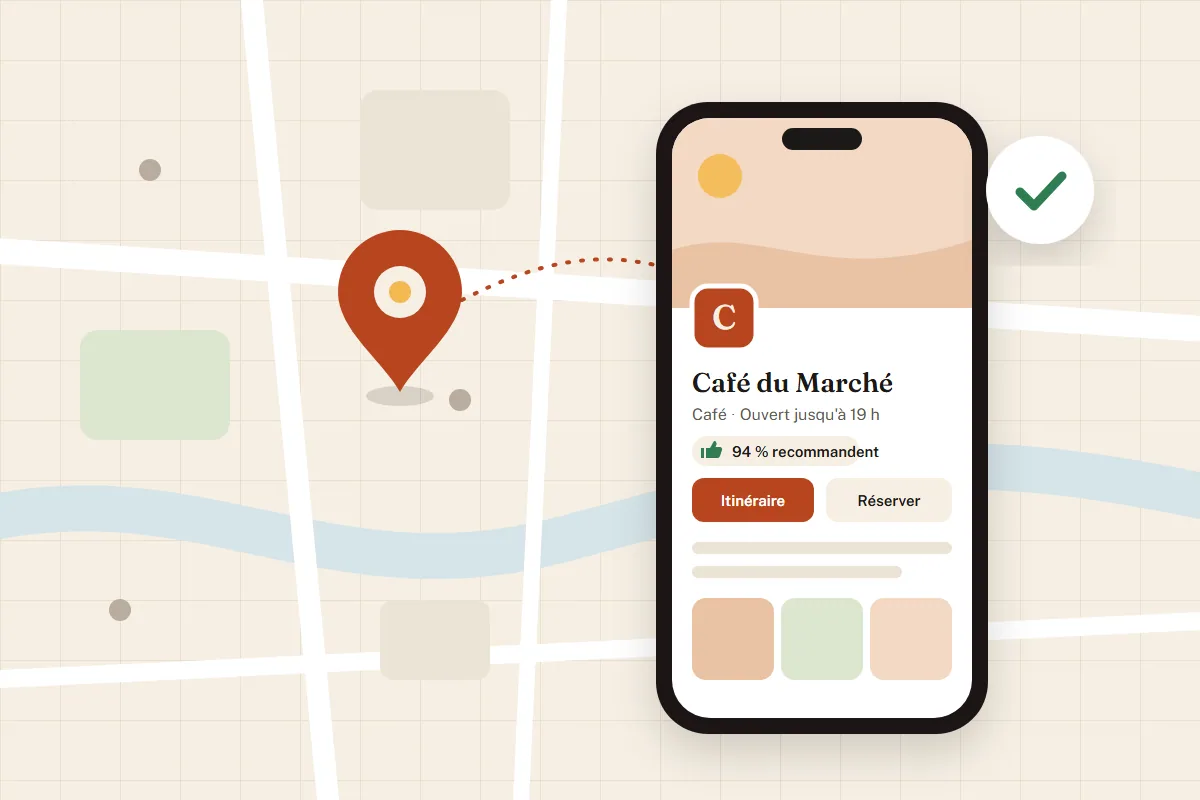
When a customer looks for a restaurant, a hairdresser or a garage on an iPhone, they often land in Apple Maps or ask Siri. What they see comes from your business listing at Apple. Apple Business Connect was the free tool used to manage it. Since April 2026, it has been part of a broader platform, Apple Business. This guide explains how to create or claim your Apple Maps listing, get it verified, make it appealing and keep it up to date, based on Apple's official rules as of October 2026.
To see where your Google and Apple listings stand, ask monbizness for a local visibility check.
Apple Business Connect is now Apple Business
On March 24, 2026, Apple announced a new platform, Apple Business, which opened on April 14, 2026. It brings together three services that used to be separate: Apple Business Connect (listing and brand management), Apple Business Manager (device management) and Apple Business Essentials. The old businessconnect.apple.com address now redirects to business.apple.com.
For a local business, nothing changes in substance: your Maps listing is managed in the same place, and locations already claimed, photos and settings were carried over to the new platform. The service is still free. Only a few add-ons are paid (extra iCloud storage, AppleCare+ for Business), and they are limited to the United States. In the rest of this guide, we refer to Apple Business, but everything applies to what you knew as Apple Business Connect.

Why your Apple Maps listing matters
Your Apple listing does not only appear in Maps. The same information feeds Siri, iPhone search, the Mail app and Wallet. An incomplete or wrong listing (outdated hours, an old phone number, a storefront photo of another shop) therefore shows up wherever an iPhone user comes across your name.
In France, the iPhone accounts for about a third of mobile web traffic (34.6% in September 2026 according to Statcounter). Google Maps remains the most used maps app, but some of your customers never go through Google to get directions: Apple Maps is where they discover you. Looking after both listings means leaving no one out, and you will find our guides on Google Business Profile and local visibility for the Google side.

Finally, consistency matters: search engines and AI assistants cross-check information published across several sources. The same name, address and phone number on Google, Apple and directories build trust in your business, as our article on customer reviews and local SEO explains.
Create or claim your listing, step by step
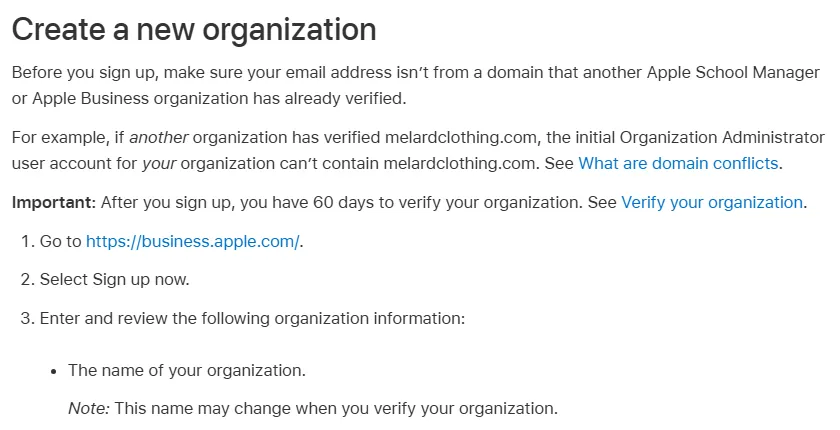
1. Create your Apple Business account
Go to business.apple.com and sign up your business. A personal Apple Account carried over from the former Business Connect still works, but only for brand and location management; to access every feature, Apple asks for a Managed Apple Account. Preferably use an email address on your business domain. After signing up, you have 60 days to get your organization verified.
2. Claim a location already in Maps
Your business may already be listed in Apple Maps, based on public sources. Search for it in Apple Business and claim it. Verification works in one of two ways: through your organization, if Apple has already verified it, or through an automated call to the phone number Apple has for that location, with a 4-digit code to enter. If that number is no longer correct, fix it first.
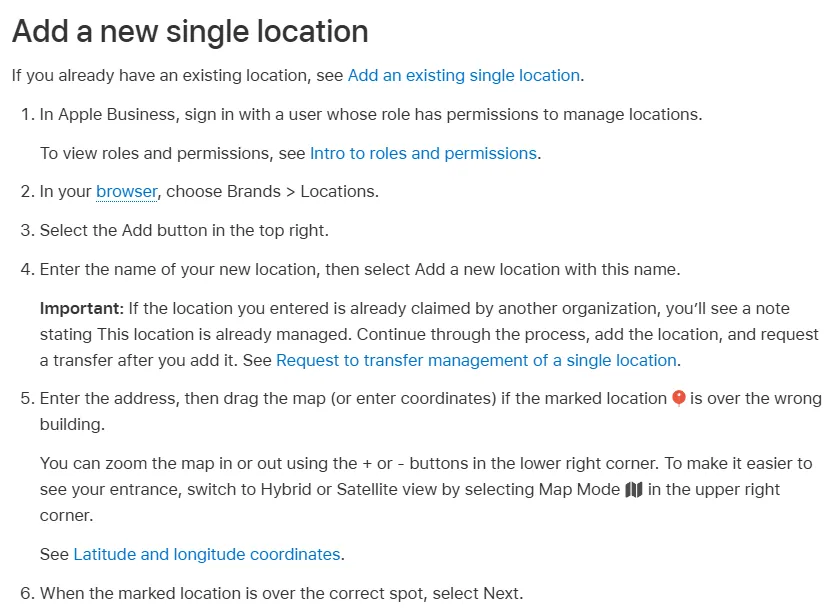
3. Create a new location
If your business does not exist in Apple Maps, create it. Your organization must be verified first, then the location goes through review by Apple. For a business that has not opened yet, the opening date cannot be more than 6 months away.
4. Take over a location managed by someone else
A former manager, an agency or a provider already claimed the listing? Request a transfer and attach supporting evidence (business license, water, electricity or gas bill at the location's address). Apple states that the review takes up to 5 business days.
5. Get your organization verified
Apple asks for a business identifier (registration number, D-U-N-S number) and an official document: business registration extract, VAT number, license (alcohol, food, health), commercial lease or a bill. The stated turnaround is up to 5 business days, longer at busy times. Apple may call or email you during the review: if you miss a call, call back quickly so the file is not blocked.
Make your listing appealing
The basics
Exact business name, primary category, address, phone, website, regular hours and special hours (public holidays, closures, late openings). The category matters more than it seems: it determines which action buttons are offered on your listing. Keep your hours up to date, because Apple corrects a listing itself when users report a wrong name, status or hours, and then notifies you by email.
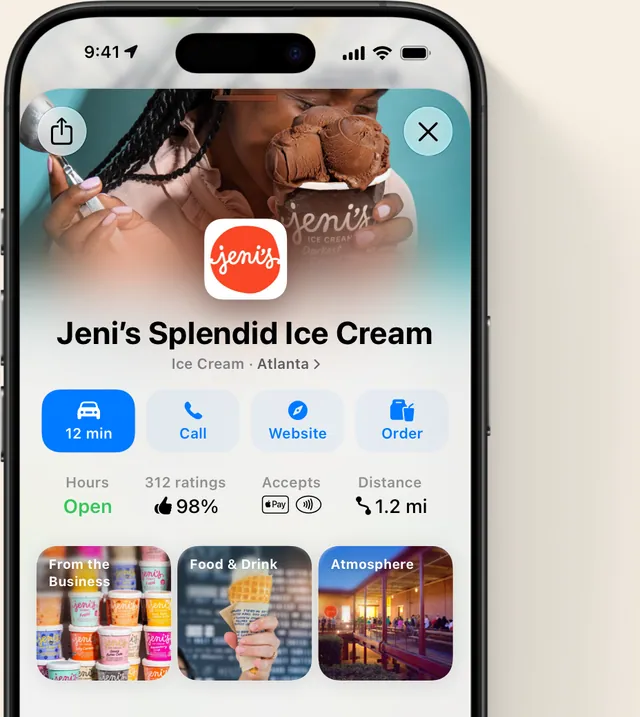
Logo and cover photo
These two images make the first impression. Apple sets precise rules:
- Logo: square, at least 1024 x 1024 pixels, in JPEG, PNG, HEIF or SVG, on a solid background rather than a transparent one.
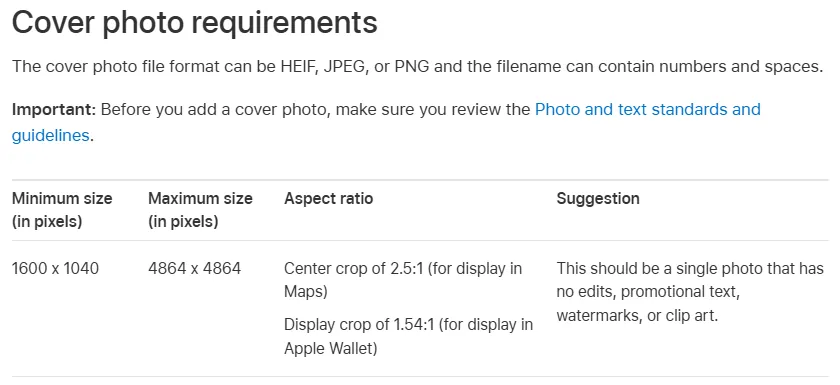
- Cover photo: at least 1600 x 1040 pixels, in JPEG, PNG or HEIF. It is center-cropped (2.5:1 in Maps, about 1.5:1 in Wallet): keep the subject in the middle.
- Not allowed: collages, promotional text, watermarks, clip art or heavy editing. A real photo of your storefront, your dining room or your best-selling product works better than any advertising visual.
Action buttons
Actions are the buttons that send customers to your website or booking tool: Reserve, Menu, Order, Takeout, Delivery for a restaurant, Book an appointment for a salon. The first action you create becomes the primary action, the most prominent one; choose the one that brings in the most customers. Each action is reviewed by Apple (up to 3 business days) and the same web address cannot be used for two action types. These buttons appear on up-to-date iPhones and iPads (iOS or iPadOS 17.4 and later).

Showcases
Showcases are small promotional cards displayed on your listing: a 38-character title, a 100-character description, an image and a button. They stay live for 90 days by default, up to 365 days. Every showcase is reviewed by Apple, so allow at least 3 days before it goes live: prepare your seasonal offers in advance. If showcases do not appear in your account, check their availability for your country in the portal.
Mail and payments in your colors
Apple Business also lets you display your logo and name in recipients' Mail app (Branded Mail), provided you send from your business domain with DMARC authentication and a DKIM signature. If you take payments with Tap to Pay on iPhone, available in France, your logo can also appear on the payment screen.
Ratings and reviews in Apple Maps
This is the big difference with Google. In Apple Maps, iPhone users do not leave stars or written comments: they recommend a place or not with a thumbs up or down, on a few criteria that depend on the type of business (food, service or atmosphere for a restaurant, for example), and they can add photos. The listing then shows a recommendation percentage.
Alongside these ratings, Maps displays reviews from partner platforms depending on the type of place, such as Tripadvisor, TheFork or Yelp. That is where the written reviews are, so those are the platforms where you need to be present and active: our comparison of review platforms for the hotel industry helps you choose yours.
One important point: Apple Business does not let you reply to ratings left in Maps. To talk with your customers, reply on Google and on partner platforms with the same care, following our method to answer a Google review effectively. A happy customer who recommends you on Google is likely to do the same in Maps: the best strategy is still to ask your customers for feedback on a regular basis.
Apple listing vs Google profile
The two listings complement each other more than they compete. Here is what sets them apart in practice.
| Apple Business (Maps) | Google Business Profile | |
|---|---|---|
| Cost | Free | Free |
| Where the listing appears | Maps, Siri, iPhone search, Mail, Wallet | Google Search, Google Maps |
| Reviews | Thumbs up or down per criterion, photos; written reviews from partner platforms | 1 to 5 star rating and written reviews |
| Replying to reviews | Not possible from Apple Business | Possible, public reply under each review |
| Promotions | Showcases reviewed by Apple, 90 to 365 days | Posts published from the profile |
| Unique strengths | Logo in Mail, logo on Tap to Pay | Questions and answers, messages, detailed menu or services |
On Google, the profile remains the main lever for local visibility and reviews carry a lot of weight, as our piece on how Google reviews drive local visibility shows. Start there if you are starting from scratch, then copy exactly the same information to Apple. For the Google profile, our guide to optimizing your Google Business Profile and its reviews covers each section.
Apple Maps SEO: best practices
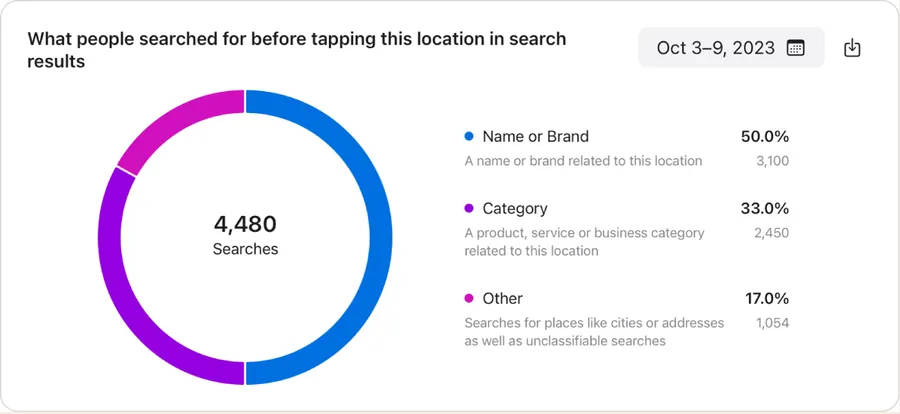
Apple does not publish its Maps ranking criteria. The searches that lead to a listing are split between brand name, category and other queries, as Apple Business insights show. To rank well on a category search ("bakery", "pizza near me"), the levers within your reach are:
- An accurate primary category that describes what you actually do, not what you would like to target.
- The same information everywhere: same name, address and phone number as on Google, your website and directories.
- Always accurate hours, special hours included, so you never send a customer to a closed door.
- Real, recent photos that follow Apple's formats.
- A useful primary action (book, order, make an appointment) that turns a view into a customer.
- Regular recommendations: the more satisfied and the more often asked your customers are, the more feedback they leave, on Google and in Maps alike.
Then follow the insights provided by Apple Business: searches, listing views, direction requests, calls, website clicks. They can be exported as CSV and viewed by day, week or month. Small volumes are shown as zero to protect privacy: do not worry if a small business sees few figures in the first weeks.
Your Apple listing does not live on its own: it relies on the same reputation as your Google profile and your review platforms, and our article on why reviews matter for a local business shows why that volume of reviews counts so much. To ask every customer for a review, reply quickly and track your reputation across all these platforms from one place, monbizness handles this work day to day.
Sources: Apple Newsroom, March 24, 2026, Apple Business User Guide (Apple Support), Apple Business feature availability by country, Statcounter, mobile operating systems in France. Information checked on October 7, 2026.
Frequently asked questions
Is Apple Business Connect free?
Yes. Apple Business Connect, renamed Apple Business in April 2026, is free to create, claim and manage your Apple Maps listing. Only add-ons (extra iCloud storage, AppleCare+ for Business) are paid, and only in the United States.
How long before my listing appears in Apple Maps?
Apple states up to 5 business days to verify an organization, a new location or a transfer, and up to 3 business days for an action. For a location already in Maps, claiming it is done with a phone call and a 4-digit code, with no document review.
Can I reply to reviews in Apple Maps?
No. Users recommend your business or not with a thumbs up or down, without a written comment, and Apple Business offers no reply feature. The written reviews shown in Maps come from partner platforms, where you can reply.
I have no storefront: can I have an Apple listing?
Since October 2024, Apple has opened its tool to businesses without a physical location (online stores, home services) to manage their brand, logo and emails. A listing in Maps, however, requires an address customers can visit.
I have several locations, or an agency: how does it work?
Apple Business manages one to a thousand locations from the same account, with bulk updates. You can also delegate management to an agency with a verified Apple Business account, choosing which features and brands it can edit.